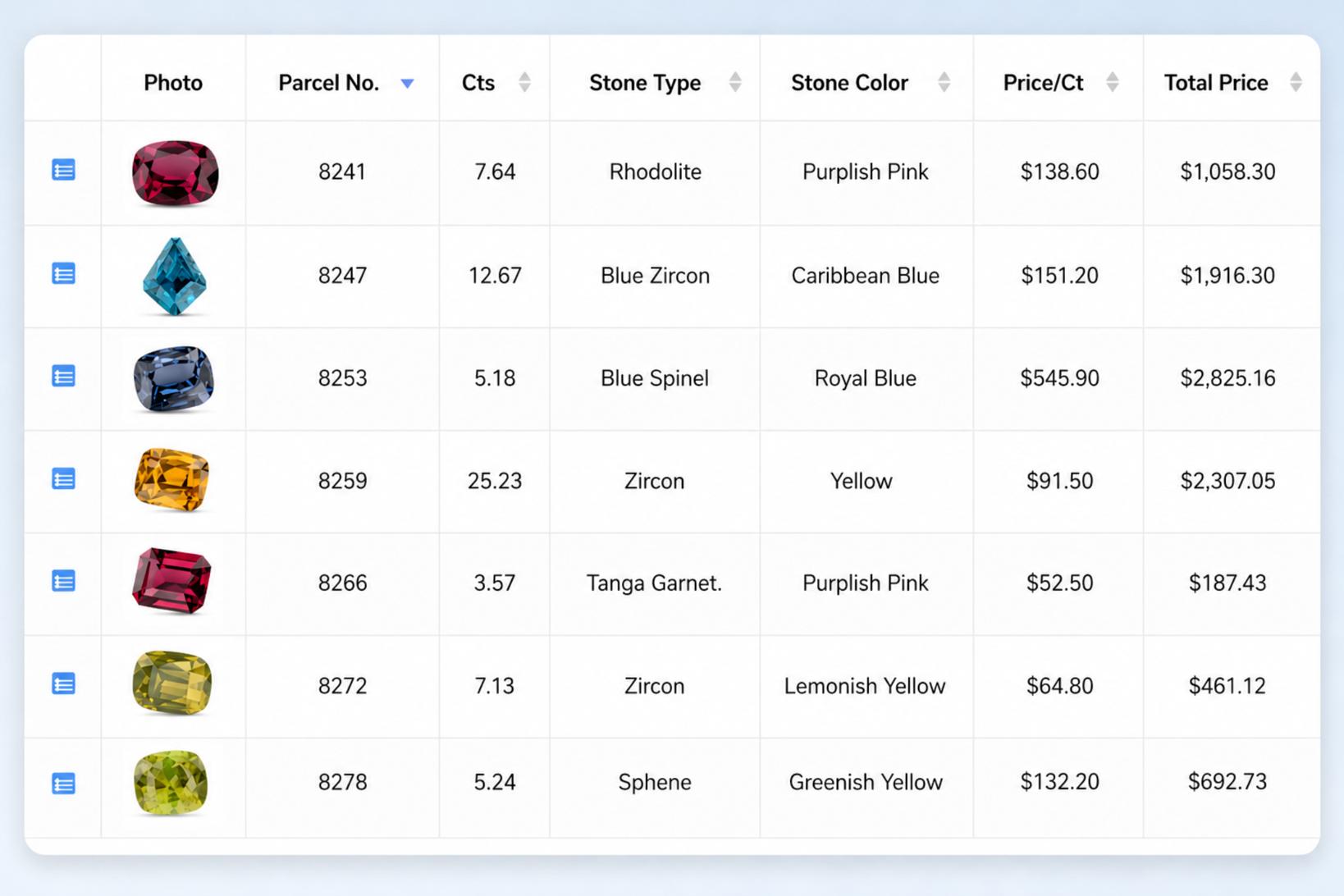
Many gemstone businesses begin with Excel.
At first, it makes sense. You may have one stock sheet, a manageable number of parcels, and one person keeping everything updated. You can add columns whenever you need them, calculate costs, and filter the list to find particular stones.
The difficulty usually begins gradually.
A separate sheet is created for memo goods. Invoices are saved somewhere else. Labels are printed from another file. Someone keeps a second copy of the stock list because they are worried about changing the original.
Before confirming whether a parcel is available, you now need to check more than one place.
That is when Excel starts becoming less useful as an inventory system - not because Excel is bad, but because gemstone inventory is more complicated than a normal product list.
A parcel does not stay on one row forever
Imagine that you buy a parcel containing 200 carats of sapphires.
Later:
- 60 carats are sent to one customer on memo.
- 40 carats are sent to another customer.
- The first customer buys 15 carats and returns the rest.
- The second customer still has the goods.
- Part of the available stock is separated into a new parcel.
- New labels are printed for the smaller parcels.
The original 200 carats are now divided between available stock, sold goods, returned goods, and goods still held by customers.
You need to know:
- How much is available now?
- Which customer has the outstanding goods?
- What quantity was sold?
- What was returned?
- What is the remaining cost?
- Which parcel number belongs to each group?
- Are the labels still correct?
Excel can hold all this information. The problem is that it normally depends on someone updating several rows, formulas, and documents correctly.
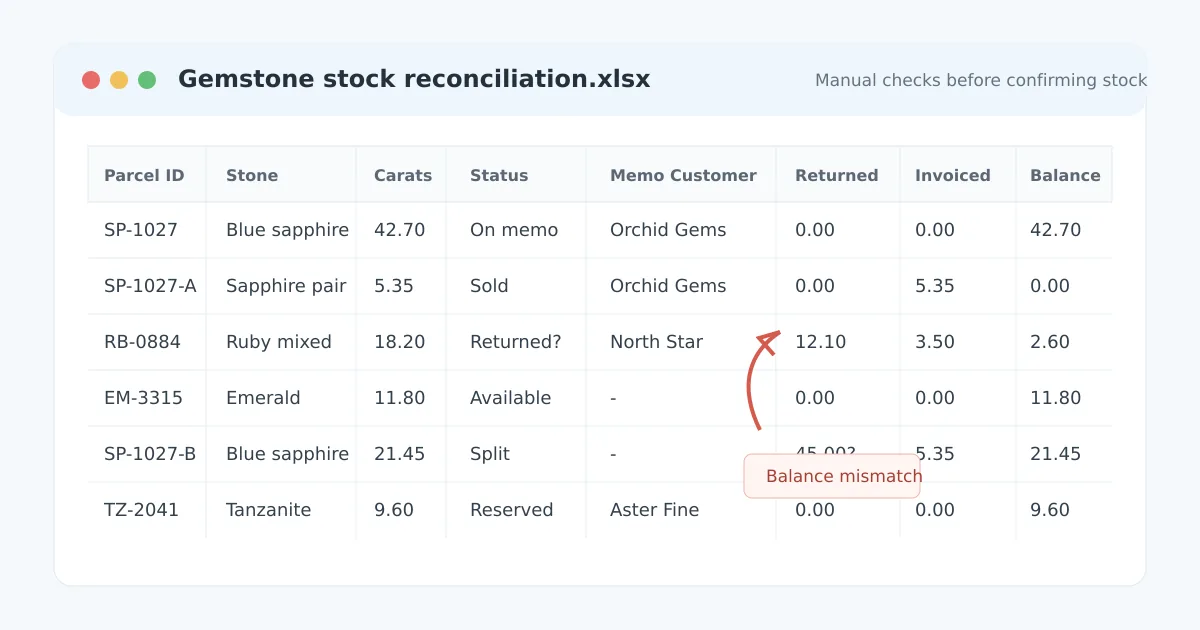
If one update is missed, the spreadsheet may still look perfectly normal.
Stock status depends on manual updates
A gemstone parcel can be available, reserved, on memo, partly sold, returned, invoiced, transferred, or closed.
In a spreadsheet, status is usually typed into a cell.
That means the status is only correct when everyone follows the same process. Someone may create a memo but forget to change the stock sheet. Returned stones may be physically back in the office while the spreadsheet still shows them with the customer.
The opposite can also happen: goods may appear available even though they are still on memo.
This becomes especially risky when more than one employee works with the inventory or when different spreadsheets are used for stock, memos, and invoices.
A customer may ask whether a parcel is available, but the answer cannot be trusted until someone checks the other files.
Formulas can fail without being noticed
Gemstone stock usually involves more than quantity.
A business may track:
- Pieces
- Carat weight
- Cost per carat
- Total cost
- Selling price
- Currency
- Remaining quantity
- Profit
Excel formulas make these calculations convenient, but they can also create quiet errors.
A formula may be overwritten when someone pastes data into a row. A newly inserted row may not contain the correct formula. One worksheet may calculate cost differently from another.
The spreadsheet continues to open normally, so the error may not be discovered until someone reviews a report or tries to reconcile the physical stock.
The real risk is not simply that an Excel formula can break. It is that the business may make decisions using a number that appears correct.
Memos, invoices, and stock become separated
A memo is part of the inventory process. It shows that specific goods have been given to a customer but have not necessarily been sold.
An invoice is also connected to inventory because it records which goods became a sale.
When the stock sheet, memo document, and invoice are maintained separately, every transaction creates more reconciliation work.
For example, after a customer returns part of a memo and purchases the rest, someone may need to:
- Update the memo.
- Change the stock quantities.
- Create an invoice.
- Update the item status.
- Check the cost and selling price.
- Print new labels for any remaining parcel.
Each individual step is simple. The problem is that all of them must agree.
A dedicated inventory system connects those actions to the same stock records. The parcel history remains visible instead of being reconstructed from several files later.
Naming and labels become inconsistent
Excel gives every user the freedom to type information however they like.
One person may enter:
- Blue Sapphire
Another may use:
- Sapphire Blue
- Blue Sapp.
- BS
The same inconsistency can affect shapes, origins, locations, treatments, customer names, and parcel references.
Over time, searching and reporting become harder because similar goods are recorded differently.
Labels can also cause problems when they are printed from copied or outdated spreadsheets. A label may show an old parcel number or point to information that has since changed.
Barcode and QR labels are most useful when they identify a single, current inventory record - not merely a row in whichever spreadsheet was used when the label was printed.
How to know when you have outgrown Excel
The number of parcels is not always the best measure.
A business with hundreds of stable stock items may manage reasonably well in Excel. A smaller business with frequent memos, returns, splits, and partial sales may struggle much earlier.
You may have outgrown Excel when:
- You need to check several files before confirming availability.
- Memo quantities regularly need to be compared with the stock sheet.
- Staff sometimes work from different versions of the inventory.
- Returned goods must be manually added back into available stock.
- Monthly reporting requires cleaning and combining several spreadsheets.
- It is difficult to see who changed a quantity, cost, or selling price.
- Parcel balances occasionally fail to match the physical stock.
- Only one person fully understands how the spreadsheet works.
- You hesitate before answering a customer because you need to verify the data first.
The clearest warning sign
You no longer trust the inventory without checking it manually.
Excel can still be useful
Moving to inventory software does not mean that Excel must disappear.
Excel remains useful for:
- Temporary analysis
- Custom calculations
- Price comparisons
- Data cleanup
- Creating offline working lists
- Exporting information for accountants or other systems
For a small business with straightforward stock and no active memo workflow, it may still be enough.
The problem comes when Excel is expected to act as the stock system, memo system, invoice system, label system, and reporting system at the same time.
What a gemstone inventory system should do
A useful system should reflect the way gemstone businesses actually work.
It should allow the business to:
- Record gemstone-specific stock details.
- Track pieces, carats, cost, price, location, and parcel status.
- Split parcels while keeping the stock history understandable.
- Create memos from existing stock.
- Record partial sales and returns.
- Generate invoices from the relevant items.
- Print barcode or QR labels linked to current records.
- Search using consistent fields.
- See outstanding memo goods.
- Review stock and sales reports.
- Control what different users may change.
- Export data when Excel analysis is useful.
The purpose is not to add more work. It is to stop entering and checking the same transaction in several places.
Moving existing inventory does not mean starting again
One concern businesses often have is that changing systems will require every parcel to be entered again manually.
A practical migration should normally begin with the existing Excel stock list.
Before importing, the business may need to clean duplicate parcel numbers, standardize descriptions, and decide which fields should be preserved. This preparation is useful because it exposes problems that may already exist in the spreadsheet.
Businesses considering a new system should ask:
- Can our existing stock be imported?
- Can we keep our current parcel numbers?
- Can the data be exported again?
- Can we continue using Excel for additional analysis?
- How will active memo goods be handled?
- How much training will staff require?
The system should fit the business workflow rather than forcing the business to rebuild everything from the beginning.
Managing gemstone inventory with Carats.Online
Carats.Online is designed for gemstone businesses that need to manage stock, parcels, memos, invoices, labels, and reports in one place.
Instead of preparing a memo separately and then updating the stock spreadsheet, users select the relevant stock records. Returns, sales, and invoices remain connected to those items, making it easier to understand the current parcel position.
The system also supports gemstone-specific details, barcode or QR labels, customer and supplier records, reporting, user permissions, and activity history.
Excel can still be used when an export or additional analysis is needed. It simply does not have to remain the live source of truth for the inventory.
Final thought
Excel is often a good place to begin.
But as parcels are divided, sent on memo, partly returned, sold, invoiced, and relabeled, the spreadsheet has to represent more and more connected events.
At that stage, the question is not whether Excel can store the information. It can.
The question is whether you can still trust the answer without checking several rows, files, and documents first.
When that manual checking becomes part of every transaction, it may be time to move the live inventory into a system built for the way gemstone businesses actually work.
Is your gemstone inventory becoming difficult to manage in Excel?
See how Carats.Online connects parcels, memos, invoices, labels, and reporting in one system.
Request a demonstration